
Afficheur LED multiligne AlphaVision PC
L'AlphaVision est un système d'affichage LED multiligne modulaire, disponible en version full-matrix (entièrement graphique, 96 à 256 colonnes x 32 à 128 rangées) ou character-matrix (24 à 48 caractères par ligne, 4 à 12 lignes). Disponible en rouge, rouge superbright ou tricolore. Piloté via AlphaNET / Alpha protocol.
Toujours pris en charge pour le logiciel et les réparations.
Modèle discontinué, plus disponible à l'état neuf. Alternative actuelle : Alpha 9000 RGB

L'AlphaVision est un système d'affichage LED multiligne modulaire. Il est disponible en deux versions : full-matrix (entièrement graphique, 96 à 256 colonnes LED de large et 32 à 128 rangées de haut) et character-matrix (24 à 48 caractères par ligne, 4 à 12 lignes). La couleur des LED est rouge, rouge superbright ou tricolore.
L'ancien AlphaVision modulaire est un modèle abandonné. Le successeur full-colour actuel est la série Alpha 9000 RGB.
Meilleur choix pour
- Messages graphiques ou textuels multilignes en grand format
- Choix entre full-matrix (graphique) ou character-matrix (texte)
- Rouge, rouge superbright ou tricolore
Moins adapté à
- Lecture de photos ou de vidéos en full-color
- Applications nécessitant l'AlphaVision FS actuel à maintenance frontale
Applications typiques
- Panneaux d'information et d'annonces
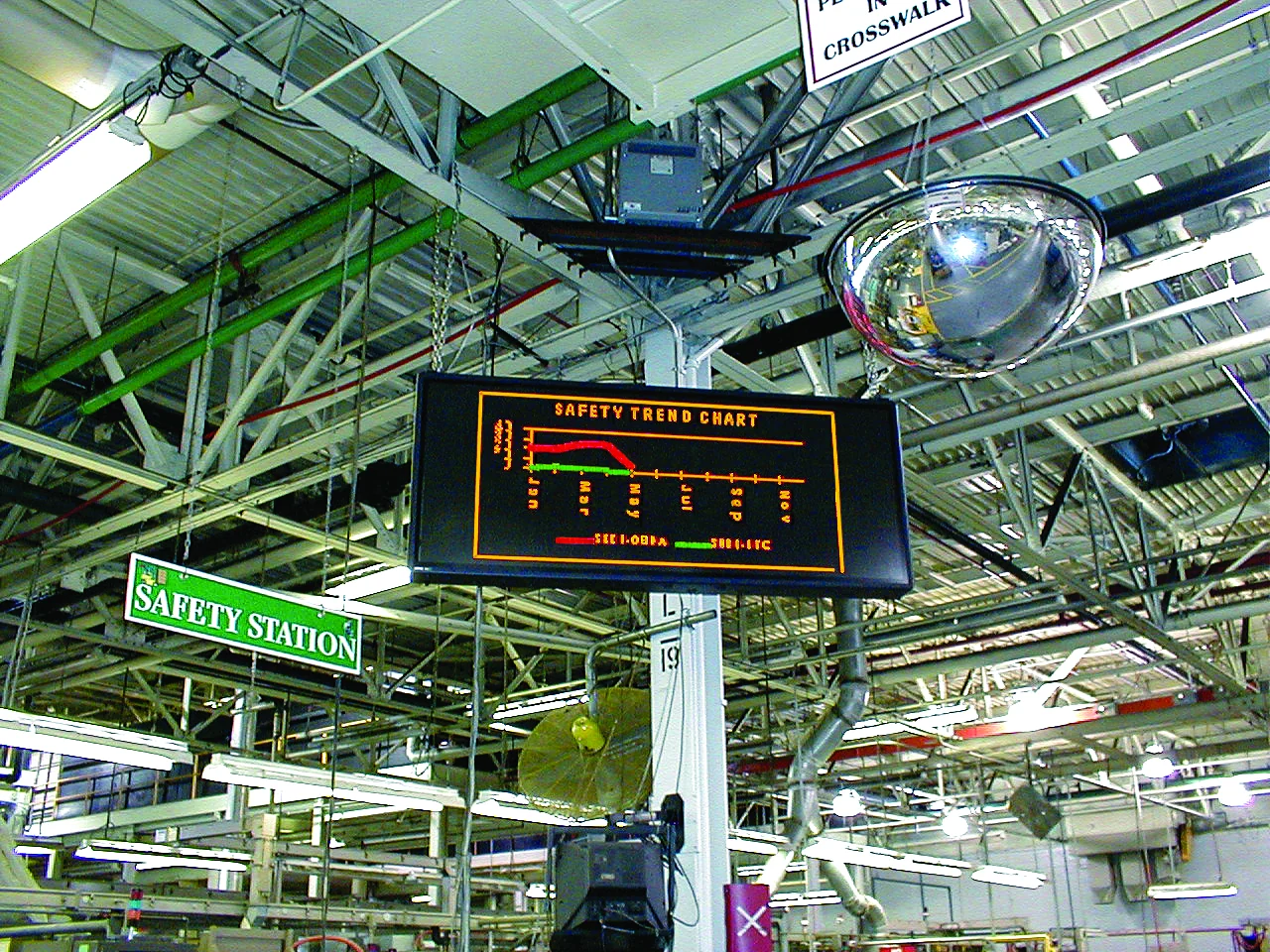
- Affichage de production et de statut
- Stands de salon et espaces publics
Informations produit AlphaVision PC
Afficheur
| Type | Afficheur LED multiligne modulaire (full-matrix ou character-matrix) |
|---|---|
| Full-matrix | 96, 128, 160, 192, 224 ou 256 colonnes x 32 à 128 rangées |
| Character-matrix | 24, 32, 40 ou 48 caractères/ligne x 4, 6, 8, 10 ou 12 lignes |
| Couleur | Rouge, rouge superbright (SBR) ou tricolore (TRI) |
| Commande | Commutateur DIP (adresse série) + PC (AlphaNET / Alpha protocol) |
| Player | AlphaNET / Alpha protocol |
Photos


Questions fréquentes
Quelle est la différence entre full-matrix et character-matrix ?
Un AlphaVision full-matrix est entièrement graphique (pixels libres, 96 à 256 colonnes x 32 à 128 rangées) pour les graphiques et le texte. Un character-matrix affiche des positions de caractères fixes (24 à 48 caractères par ligne, 4 à 12 lignes) et est destiné aux messages textuels.
Quelles couleurs sont disponibles ?
L'AlphaVision est disponible en rouge, rouge superbright (SBR) ou tricolore (TRI).
L'AlphaVision est-il encore disponible ?
Non, il s'agit de l'ancien AlphaVision modulaire. Le successeur full-colour actuel est la série Alpha 9000 RGB. N'hésitez pas à nous contacter pour un conseil.
Toutes les fiches techniques
- Guide de sélection industriel 2006Voir la fiche techniqueTélécharger le PDF
- AlphaVision PC brochureVoir la fiche techniqueTélécharger le PDF
- AlphaVision PC brochure (2002)Voir la fiche techniqueTélécharger le PDF
- AlphaVision PC white paperVoir la fiche techniqueTélécharger le PDF
- AlphaVision PC LED Graphic Displays brochureVoir la fiche techniqueTélécharger le PDF
Manuels
Installation51
- AlphaVision PC 320 x 112 Double-Sided Signs Electrical Installation GuideTélécharger le PDF
- AlphaVision PC 320 x 128 Double-Sided Signs Mechanical Installation GuideTélécharger le PDF
- AlphaVision PC 320 x 80 Double-Sided Signs Electrical Installation GuideTélécharger le PDF
- AlphaVision PC 320 x 80 Double-Sided Signs Mechanical Installation GuideTélécharger le PDF
- AlphaVision PC 320 x 96 Double-Sided Signs Electrical Installation GuideTélécharger le PDF
- AlphaVision PC 320 x 96 Double-Sided Signs Mechanical Installation GuideTélécharger le PDF
- AlphaVision PC 320x112 Double-Sided Sign Electrical Installation GuideTélécharger le PDF
- AlphaVision PC 320x112 Double-Sided Sign Mechanical Installation GuideTélécharger le PDF
- AlphaVision PC ANDON Installation ManualTélécharger le PDF
- AlphaVision PC ANDON Type 12 Sign Installation InstructionsTélécharger le PDF
- AlphaVision PC Installation InstructionsTélécharger le PDF
- AlphaVision PC NEMA Type 12 Installation InstructionsTélécharger le PDF
- AlphaVision PC Series III 192x16 Sign Electrical Installation InstructionsTélécharger le PDF
- AlphaVision PC Series III 192x48 and 192x64 Sign Electrical Installation InstructionsTélécharger le PDF
- AlphaVision PC Series III 192x48 and 192x64 Sign Mechanical Installation IntructionsTélécharger le PDF
- AlphaVision PC Series III 192x80 & 192x96 Sign Electrical Installation InstructionsTélécharger le PDF
- AlphaVision PC Series III 192x80 and 192x96 Sign Mechanical Installation InstructionsTélécharger le PDF
- AlphaVision PC Series III 256x32 Sign Electrical Installation InstructionsTélécharger le PDF
- AlphaVision PC Series III 256x32 Sign Mechanical Installation InstructionsTélécharger le PDF
- AlphaVision PC Series III 256x48 & 256x64 Sign Electrical Installation InstructionsTélécharger le PDF
- AlphaVision PC Series III 256x48 and 256x64 Sign Mechanical Installation InstructionsTélécharger le PDF
- AlphaVision PC Series III 256x96 & 256x112 Sign Electrical Installation InstructionsTélécharger le PDF
- AlphaVision PC Series III 256x96 and 256x112 Sign Mechanical Installation InstructionsTélécharger le PDF
- AlphaVision PC Series III 320x128 and 320x112 Sign Electrical Installation InstructionsTélécharger le PDF
- AlphaVision PC Series III 320x128 and 320x112 Sign Mechanical Installation InstructionsTélécharger le PDF
- AlphaVision PC Series III 320x32 Electrical Installation InstructionsTélécharger le PDF
- AlphaVision PC Series III 320x32 Sign Mechanical Installation InstructionsTélécharger le PDF
- AlphaVision PC Series III 320x64 Sign Electrical Installation InstructionsTélécharger le PDF
- AlphaVision PC Series III 320x64 Sign Mechanical Installation GuideTélécharger le PDF
- AlphaVision PC Series III 320x80 and 320x96 Sign Electrical Installation InstructionsTélécharger le PDF
- AlphaVision PC Series III 320x96 and 320x80 Sign Mechanical Installation InstructionsTélécharger le PDF
- AlphaVision PC Sign New Type-B Double-Sided Electrical Installation GuideTélécharger le PDF
- AlphaVision PC Sign New Type-B Double-Sided Mechanical Installation GuideTélécharger le PDF
- AlphaVision PC Sign Old Type-B Double-Sided Electrical Installation GuideTélécharger le PDF
- AlphaVision PC Sign Old Type-B Double-Sided Mechanical Installation GuideTélécharger le PDF
- AlphaVision PC Sign Type B Single0Sided Electrical Installation GuideTélécharger le PDF
- AlphaVision PC Sign Type-C Double-Sided Electrical Installation GuideTélécharger le PDF
- AlphaVision PC Sign Type-C Double-Sided Mechanical Installation GuideTélécharger le PDF
- AlphaVision PC Sign Type-C Single-Sided Mechanical Installation GuideTélécharger le PDF
- AlphaVision PC Sign Type-D Double-Sided Electrical Installation GuideTélécharger le PDF
- AlphaVision PC Sign Type-D Double-Sided Mechanical Installation GuideTélécharger le PDF
- AlphaVision PC Sign Type-D Single-Sided Electrical Installation GuideTélécharger le PDF
- AlphaVision PC Sign Type-D Single-Sided Mechanical Installation GuideTélécharger le PDF
- AlphaVision PC Sign Type-F Single-Sided Mechanical Installation GuideTélécharger le PDF
- AlphaVision PC Signs Type A Double-Sided Electrical Installation GuideTélécharger le PDF
- AlphaVision PC Type A Double-Sided Signs Mechanical Installation InstructionsTélécharger le PDF
- AlphaVision PC Type F Double-Sided Sign Electrical Installation GuideTélécharger le PDF
- AlphaVision PC Type F Double-Sided Sign Mechanical Installation GuideTélécharger le PDF
- AlphaVision PC Type-B Single-Sided Mechanical Installation GuideTélécharger le PDF
- AlphaVision PC Type-C Single-Sided Electrical Installation GuideTélécharger le PDF
- AlphaVision PC Unpacking InstructionsTélécharger le PDF
Pièces13
- AlphaVision PC Series II Automatic Support Latch Upgrade Kit InstructionsTélécharger le PDF
- AlphaVision PC Series II Fan Replacement InstructionsTélécharger le PDF
- AlphaVision PC Series III Controller Replacement InstructionsTélécharger le PDF
- AlphaVision PC Series III Driver Board Replacement InstructionsTélécharger le PDF
- AlphaVision PC Series III Loop Back Board Replacement InstructionsTélécharger le PDF
- AlphaVision PC Series III Ribbon Cable Replacement InstructionsTélécharger le PDF
- AlphaVision PC Series III Tune Blaster Replacement InstructionsTélécharger le PDF
- AlphaVision PC Sign Type A Controller Replacement InstructionsTélécharger le PDF
- AlphaVision PC Sign Type-B Sign Controller Replacement InstructionsTélécharger le PDF
- AlphaVision PC Sign Type-C Sign Controller Replacement InstructionsTélécharger le PDF
- AlphaVision PC Sign Type-D Sign Controller Replacement InstructionsTélécharger le PDF
- AlphaVision PC Sign Type-F Sign Controller Replacement Instructions1Télécharger le PDF
- AlphaVision PC Sign Type-F Sign Controller Replacement InstructionsTélécharger le PDF
Logiciel4
Général7
- Remplacer l'EPROM du micrologiciel dans les afficheurs ALPHATélécharger le PDF
- AlphaVision PC Ford Sign User ManualTélécharger le PDF
- AlphaVision PC Series III Sign User ManualTélécharger le PDF
- AlphaVision PC Service Bulletin 07-0005 Sign MaintenanceTélécharger le PDF
- AlphaVision PC Type A, B, C, D, and F Sign User ManualTélécharger le PDF
- Schéma Theatre CommunicationsTélécharger le PDF
- Comment interpréter les étiquettes Sign IDTélécharger le PDF